HackMD: real-time collaborating in documentation using MarkDown: http://www.hackmd.io
Slidev: Quickly creating slides: http://www.sli.dev
Mermaid: create diagrams by writing simple text: https://mermaid.js.org/
Posted by binglongx on May 25, 2024
For a project distributed as source code in Unix-like systems, upon getting the source, normally you would run:
./configure
make
The magic behind configure, make, make install – How it works in Unix explains what’s happening. Below is a simple drawing of the flow. Note that “project startup” was done when the project was first created by the project owner.
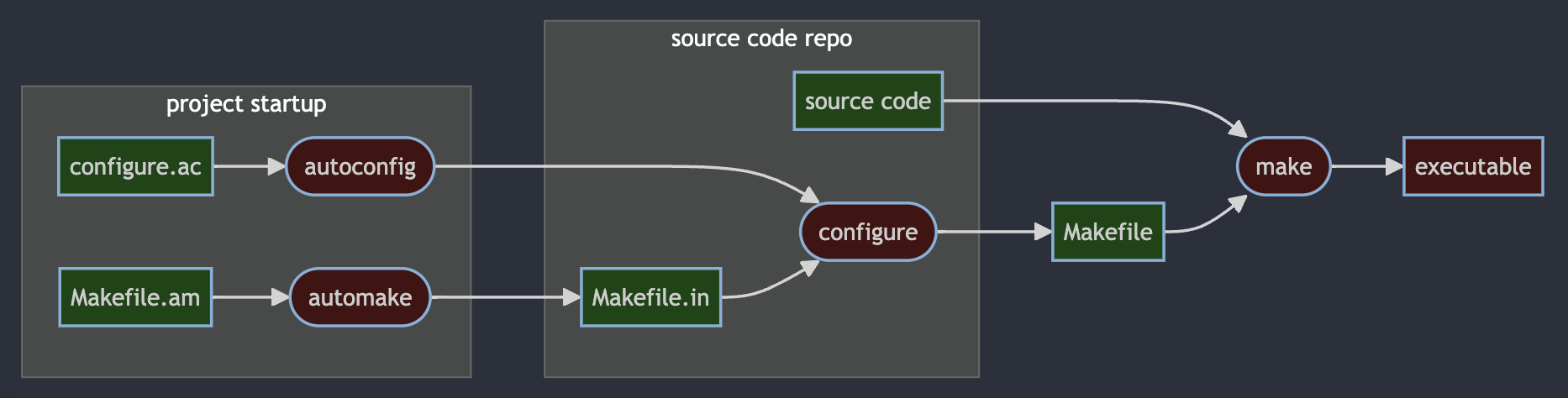
The corresponding Mermaid flow char diagram source code:
%% Mermaid drawing, view with https://mermaid.live/
flowchart LR

    classDef Executable fill:#411,stroke-width:2px;
    classDef File fill:#141,stroke-width:2px;

    subgraph project startup
    a[Makefile.am]:::File
    b([automake]):::Executable
    d[configure.ac]:::File
    e([autoconfig]):::Executable
    end

    subgraph source code repo
    c[Makefile.in]:::File
    f([configure]):::Executable
    j[source code]:::File
    end

    g[Makefile]:::File
    h([make]):::Executable
    i[executable]:::Executable

    a[Makefile.am] --> b([automake]) --> c[Makefile.in]
    d[configure.ac] --> e([autoconfig]) --> f([configure])
    c[Makefile.in] --> f([configure]) --> g[Makefile]
     j[source code] --> h([make])
    g[Makefile] --> h([make]) --> i[executable]
See also: Build Project with CMake
Posted in C++ | Tagged: ./configure, autoconfig, automake, C++, flow chart, make, Makefile, Mermaid, unix | Leave a Comment »
 Binglong's space