Binglong's space

Random notes on computer, phone, life, anything

Type-Punning with Union

Posted by binglongx on November 15, 2024

Type-punning with Union

Check this snippet:

union a_union {
  int i;
  double d;
};

int f() {
  union a_union t;
  t.d = 3.0;
  return t.i;
}

Does the code work to whatever expection you may have?

This is actually one form of type punning through aliasing in union.

According to C++, e.g., C++2023 (N4928) 11.5.1, “At most one of the non-static data members of an object of union type can be active at any time”. The last written value is t.d, so only that member is active. Reading t.i is therefore undefined behavior (UB) in C++.

This practice has been widely used in the C world, and C permits this. Therefore, often times C++ programmers, especially who have legacy code from C, want this to work. Although C++ standard treats this as UB, some compilers support this:

Do check limitations in the URL above, for example, you cannot take the address and do pointer magic.

Example Usage

Let’s say you have existing code:

#include <iostream>

struct Vec3 {
    float f[3];

    float& operator()(size_t index) {
        return f[index];
    }
    float& operator[](size_t index) {
        return f[index];
    }
};

int main() {
    Vec3 v;
    v(0) = 1;
    v[1] = 2;
    v.f[2] = 5;
    std::cout << v[0] << ", " << v(1) << ", " << v.f[2] << "\n";
}

You are happy with the code. But then one day someone comes and asks, “Your Vec3 class is great. I have a lot of existing code that uses a similar 3D vector class, but they access the data through .x, .y and .z. Can I use your nice Vec3 class instead without modifying a lot of my code?”

Basically, you can redefine your Vec3 class, but you want the new Vec3 class to support the current public API, as well as new API that allows access members through .x, .y and .z.

Obviously you cannot add new data members like x, y, and z, because that would have two copies for each value, and there’s no way that you can keep them always in sync as clients can freely modify x or f[0] independently. Adding x, y, and z as references to f members seems to work, but it makes the class much larger, also not memcpy safe.

Enter union, more specifically, anonymous union.

#include <iostream>

struct Vec3 { 
    union{
        struct { 
            float x;
            float y;
            float z; 
        }; 
        float f[3];
    };

    float& operator()(size_t index) {
        return f[index];
    }
    float& operator[](size_t index) {
        return f[index];
    }
}; 


int main() {
    Vec3 v;
    v(0) = 1;
    v[1] = 2;
    v.f[2] = 5;

    std::cout << v[0] << ", " << v(1) << ", " << v.f[2] << "\n"; // Line AA
    std::cout << v.x << ", " << v.y << ", " << v.z << "\n";      // Line BB
}

Line AA demonstrates the API of old Vec3, and Line BB demonstrates the new API. Both are supported.

For this two happen, there are two steps:

  • Anonymous struct. In the union definition, the anonymous struct provides x/y/z members. The anonymous struct is both a type definition and an anonymous member object of the union. Being anonymous struct member allows user of parent object, i.e., the union, to directly access the data through .x, .y and .z.
  • Anonymous union. In the Vec3 class, it has the anonymous union type and the same time as anonymous union member of the class. This allows the Vec3 class user to access union members directly, because the union member of Vec3 does not have a name.

Combining the two steps above, now client of Vec3 can access through .x, .y and .z directly.

Theoretically this approach falls into the UB land, but due to the support of extension in GCC and Clang, this is actually safe to do.

Posted in C++ | Tagged: , , , , , , , , , | Leave a Comment »

Retirement Plans: 401(k), IRA, Traditional or Roth

Posted by binglongx on November 9, 2024

Comparison Table of 401(k), Roth 401(k), IRA, and Roth IRA

Features401(k) (Traditional)Roth 401(k)IRA (Traditional)Roth IRA
Opening PlanEmployer sponsoredEmployer sponsoredAny individualAny individual
Contributionbefore-tax
(tax deferred to distribution)
(contribution deducted from W2 taxable income)
after-tax
(contribution not deducted from W2 taxable income)
before-tax
(tax deferred to distribution)
(contribution deducted from W2 taxable income)
after-tax
(contribution not deducted from W2 taxable income)
Distributiontaxed as income
(on contributions and gains)
tax-free
(on contributions and gains)
taxed as income
(on contributions and gains)
tax-free
(on contributions and gains)
Contribution limit[Combined with Roth 401(k)]

2022: $20,500
2023: $22,500
2024: $23,000
2025: $23,500
[Combined with 401(k)]

2022: $20,500
2023: $22,500
2024: $23,000
2025: $23,500
[Combined with Roth IRA]

2022: $6,000
2023: $6,500
2024: $7,000
2025: $7,000
[Combined with IRA]

2022: $6,000
2023: $6,500
2024: $7,000
2025: $7,000
Employer matchEmployer may matchEmployer may match

Match goes to your 401(k) pre-tax. It may allow moving to Roth 401(k) after paying tax.
N/AN/A
Contribution limit
Employee + Employer
[Combined with Roth 401(k)]

2023: $66,000 or income
2024: $69,000 or income
2025: $70,000 or income
[Combined with 401(k)]

2023: $66,000 or income
2024: $69,000 or income
2025: $70,000 or income
N/AN/A
Catch-up contribution
(age 50+)
[Combined with Roth 401(k)]

2022: $6,500
2023: $7,500
2024: $7,500
2025: $7,500
2026:
– <$145k incomer: $7,500
– >$145k incomer: $0.
must contribute to Roth 401(k)
[Combined with 401(k)]

2022: $6,500
2023: $7,500
2024: $7,500
2025: $7,500
2026: $7,500
[Combined with Roth IRA]

2025: $1,000
[Combined with IRA]

2025: $1,000
(Modified AGI) Income limit
to be able to contribute
(married file jointly)
No income limitNo income limitPhase-out range:

You in work retirement plan:
2024: $123k-$143k

Spouse in work retirement plan:
2024: $230k-$240k

Neither in work retirement plan:
No income limit
Phase-out range:

2023: $218k-$228k
2024: $230k-$240k
2025: $236k-$246k
(Modified AGI) Income limit
to be able to contribute
(single / household head)
No income limitNo income limitPhase-out range:

2023: $73k-$83k
2024: $77k-$87k
Phase-out range:

2023: $138k-$153k
2024: $146k-$161k
2025: $150k-$165k
InvestmentPlan may restrictPlan may restrictMore flexibleMore flexible
Fees and costsMay be higherMay be higherMay be lowerMay be lower
Employment termination– leave as;
– transfer to new job’s plan;
– rollover to IRA;
– take distribution (may have penalty)
– leave as;
– transfer to new job’s plan;
– rollover to Roth IRA;
– take distribution (may have penalty)
No impactNo impact
Withdrawl age59.55+ year account
and
(59.5
or disabled or death)

Special rule if age>55 and job termination.
59.55+ year account
and
(59.5
or
exceptions: disabled, 1st home buy)
Early withdrawl penalty10% penalty 10% penalty and tax complexity on gain10% penalty 10% penalty
and tax on gain
Required Minimum Distributions (RMD)Must begin at 73.
Amount depends on balance and life expectancy.
no requirement if alive;
leave to your heirs;
Must begin at 73.
Amount depends on balance and life expectancy.
no requirement if alive;
leave to your heirs;

Backdoor Roth IRA

If you are a high income earner, you may not be able to contribute to a Roth IRA account (unrelated, but neither traditional IRA). For this, you may consider to create a backdoor Roth IRA. This is legal, but it has pros and cons, and may not be suitable for everyone.

You can rollover some traditional IRA or 401(k) balance to a Roth IRA, or close and convert a traditional IRA or 401(k) account to a Roth IRA. This rollover or conversion is moving pre-tax money to after-tax, and you owe income tax for the year immediately.

Note that rollover or conversion is not subject to contribution limit to Roth IRA, which is often low ($7,000 in 2025). Basically, you can rollover or conversion any amout from traditional accounts to Roth IRA. But of course, you owe more income taxes if you convert more, potentially pushing to a higher tax bracket.

For people that don’t have traditional IRA, backdoor Roth IRA means moving/converting money from (traditional) 401(k) to Roth IRA by adding moved money as taxable income for the year, disregarding income limit that would otherwise apply. Depending on how much is moved/converted, this may increase your W2 taxable income considerably.

If you can contribute to Roth 401(k), Roth IRA is attractive. They serve the same goal (tax-free on gains), but Roth 401(k) has less restrictions.

In a sense, employer sponsored Roth 401(k) is like a backdoor, since now you get access to a “Roth” account, although Roth 401(k) is not Roth IRA, it is better than Roth IRA.

Mega Backdoor Roth

A lot of employer sponsored retirement plan allows you to contribute to both 401(k) and Roth 401(k) accounts. However, take this example:

  • You contribute $13,500 to 401(k) and $10,000 to Roth 401(k), reaching employee contribution limit $23,500.
  • Your employer matches 6% of your income, say $10,000. This could go into your 401(k), or proportionally into both 401(k) and Roth 401(k).
  • The total limit is $70,000.
  • There is a $70,000 – $23,500 – $10,000 = $36,500 hole. What can you do with it?

The answer is that, you may use it as “after-tax 401(k) contributions”. This is neither pre-tax nor after-tax contribution, but somewhere in between.

Type of 401(k) contributionContributionWithdrawl in retirementNotes
Pre-taxContribute pre-taxPay ordinary income tax on contributions and gains;
RothContribute after-taxPay no tax on contributions and gains;
After-taxContribute after-taxPay no tax on contributions;
Pay ordinary income tax on gains;
Maybe not eligible for employer match

It apperas that after-tax 401(k) contribution does not have benefits: after all, you can take cash and invest yourself, and the gain will again be taxed (but as short term/long term gains).

The real benefit is that, the after-tax 401(k) contribution can be converted to a Roth account. The money can be moved to a Roth 401(k) account, so called in-plan Roth conversion. When the conversion happens, there is no tax for the amount of your contributions, but any gains will incur tax. Normally, you need to (set up) periodically rollover “after-tax 401(k) contributions” to Roth 401(k).

The reason that this is called mega backdoor, is because of the large amount it can convert into Roth. In the example above, this amount is larger than half of the $70,000 limit of 401(k) contribution.

In Fidelity, go to Contributions -> Change Contributions -> Contribution Maximizer, under “In-Plan Roth Conversion”, choose “Convert After-Tax to Roth” is basically Mega Backdoor Roth. If this is the first time, refreshing the page may show choice reverted – wait for one day or two to show correctly.

References

Posted in Life | Tagged: , , , , , , , , , | Leave a Comment »

C and Objective-C Blocks: Saving and Capturing

Posted by binglongx on October 1, 2024

Introduction

Block is a C extension feature, similar to C++’s lambda as callable object. It is more widely used in Objective-C code, but it is also supported in pure C code (of course in C++ too). You need to use compiler option -fblocks to enable it in C or C++ code for gcc and clang compilers. If you need to use Block_copy() and Block_release(), you need to #include <Block.h>.

This post does not explain general use of Block. You can refer to clang’s Language Specification for Blocks, or Apple’s Working with Blocks for more details about Block.

Instead, this post is to clarify how block capture works, and how to avoid issues using capture, from the perspective of comparison with C++ lambda.

What Is a Block Variable?

You can easily create a Block, by writing something like:

^(parameter list) {
    // code of block body
}

The construct above is called a block literal. It is basically an anonymous function, similar to C++ lambda. You cannot specify a capture list, but in the block body you can refer to objects in the enclosing scope, and that would automatically capture those objects. Block documentation points out that Block captures a const copy of the value of object in enclosing scope, and this is the only way to capture objects. That is, if an variable from enclosing scope is mentioned in the block body, a copy of that object is created in the Block state, and from within the block body it can only be accessed as constant value.

The block literal can be assigned to a block variable.

// clang++ test.cpp -std=c++20 -fblocks -O0

#include <iostream>

struct Big{
    char aa[100];
};

int main(int argc, char** argv) {
    int x = 0;
    Big big;

    auto lambda1 = [=](){
        return x; // captures x by value
    };
    std::cout << "sizeof(lambda1) : " << sizeof(lambda1) << std::endl;

    auto lambda2 = [=](){
        return big.aa[10]; // capture big by value
    };
    std::cout << "sizeof(lambda2) : " << sizeof(lambda2) << std::endl;

    auto block1 = ^(){
        return x; // captures a constant copy of x
    };
    std::cout << "sizeof(block1)  : " << sizeof(block1) << std::endl;

    auto block2 = ^(){
        return big.aa[10]; // capture a constant copy of big (and access only 10-th element)
    };
    std::cout << "sizeof(block2)  : " << sizeof(block2) << std::endl;

    return 0;
}

The code prints:

sizeof(lambda1) : 4
sizeof(lambda2) : 100
sizeof(block1)  : 8
sizeof(block2)  : 8

In C++, lambda is a value object with all state fully enclosed in it, and its size depends on how much it captures. No surprise to see lambda1 and lambda2 show very different sizes (clearly int is 4 bytes in this architecture).

Supposedly, the two blocks would have different state size, because block2 obviously captures a big object. The printout shows that the block variable (block1 and block2) is essentially a pointer type. The actual state of the block, i.e., the block object, is stored somewhere else. To avoid confusion, let’s call the block variable as block pointer, and its pointee object the block object.

Clearly, a block pointer, although appears similar to a C++ lambda, is quite different in terms of how memory is managed.

Where Is the Block Object?

So where is the block object, which may contain big state if it captures stuff?

Let’s find out with code:

// clang++ test.cpp -std=c++20 -fblocks -O0

#include <iostream>

struct Big{
    char aa[100];
};

int global = 42;
int main(int argc, char** argv) {
    int x = 0;
    Big big;
    auto block0 = ^(){
        // no captures
    };
    auto block1 = ^(){
        return x; // captures a constant copy of x
    };
    auto block2 = ^(){
        return big.aa[10]; // capture a constant copy of big (and access only 10-th element)
    };
    int y = 1;

    std::cout << "x              address : " << (void*)(&x) << std::endl;
    std::cout << "block0 pointer address : " << (void*)(&block0) << std::endl;
    std::cout << "block1 pointer address : " << (void*)(&block1) << std::endl;
    std::cout << "block2 pointer address : " << (void*)(&block2) << std::endl;
    std::cout << "y              address : " << (void*)(&y) << std::endl;
    std::cout << "block0 object  address : " << (void*)(block0) << std::endl;
    std::cout << "block1 object  address : " << (void*)(block1) << std::endl;
    std::cout << "block2 object  address : " << (void*)(block2) << std::endl;
    std::cout << "main()         address : " << (void*)(main) << std::endl;
    std::cout << "global         address : " << (void*)(&global) << std::endl;

    return 0;
}

This prints:

x              address : 0x16b6a2e7c
block0 pointer address : 0x16b6a2e70
block1 pointer address : 0x16b6a2e68
block2 pointer address : 0x16b6a2e38
y              address : 0x16b6a2e34
block0 object  address : 0x1047600e0
block1 object  address : 0x16b6a2e40
block2 object  address : 0x16b6a2e90
main()         address : 0x10475edb0
global         address : 0x104764000

For the obvious objects in stack (x, block0, block1, block2, y), addresses of them decrease nicely 0x16b6a2e7c through 0x16b6a2e34 (stack grows down in this architecture). Not a surprise.

The surprising part is the block objects.

  • block1 and block2 are obviously on stack, and seem to hide at whatever convenient location on stack.
  • block0 however is clearly not on stack. It is at a much lower address, closer to the global variable and main function code.

The reason is that, block0 does not capture anything, so its state is minimal, and it does not depend on anything at the site where it is created, therefore can live in some “global” location.

For block1 and block2, however, their states depend on what they capture in the function scope, so they are created on stack. Hopefully they are only used in the same scope, and using stack memory makes sense.

What is Block Object Size?

To understand how block captures objects, we have to check what’s stored in the block.

We can check the Block’s run-time source code in LLVM: https://github.com/llvm/llvm-project/blob/main/compiler-rt/lib/BlocksRuntime/Block_private.h#L62-L77. This provides definitions of Block_layout and Block_descriptor:

struct Block_descriptor {
    unsigned long int reserved;
    unsigned long int size;
    void (*copy)(void *dst, void *src);
    void (*dispose)(void *);
};

struct Block_layout {
    void *isa;
    int flags;
    int reserved; 
    void (*invoke)(void *, ...);
    struct Block_descriptor *descriptor;
    /* Imported variables. */
};

We can use this to check more details of a block object. A block pointer basically points to a Block_layout object. The /* Imported variables. */ part is not part of base Block_layout sturcture, but improvised by the compiler for an actual block literal, so each block would be different here. The actual size of a concrete Block_layout object is given in descriptor->size, and of course depending on how much stuff it captures.

Let’s write some code to inspect. Block_copy() “semantically” makes a copy of the block object; what this means is to be discussed below.

void inspectBlock(void* block) {
    auto aBlock = (Block_layout *)block;
    // size of block's state, including captured objects
    auto total_size = aBlock->descriptor->size;
    // size of block's state without captures
    auto base_size = sizeof(Block_layout);
    std::cout << " block at " << block << ", descriptor at " << aBlock->descriptor 
        << ", base size " << base_size << ", total size " << total_size << std::endl;
}

template<typename BlockPtr>
void testBlock(BlockPtr block, const char* caption) {
    std::cout << caption << ": \n"; 
    std::cout << "  original            : "; inspectBlock(block);
    auto copy1 = Block_copy(block);
    std::cout << "  copy 1 of original  : "; inspectBlock(copy1);
    auto copy2 = Block_copy(block);
    std::cout << "  copy 2 of original  : "; inspectBlock(copy2);
    auto copy3 = Block_copy(copy2);
    std::cout << "  copy of copy 2      : "; inspectBlock(copy3);
}

int main(int argc, char** argv) {

    auto block0 = ^(){
    };
    testBlock(block0, "block0");

    int x = 0;
    auto block1 = ^(){
        return x;
    };
    testBlock(block1, "block1");

    Big big;
    auto block2 = ^(){
        return big.aa[10];
    };
    testBlock(block2, "block2");

    std::cout << "========\n";
    std::cout << "block2: "; inspectBlock(block2);
    auto block3 = ^(){
        return big.aa[10];
    };
    std::cout << "block3: "; inspectBlock(block3);
    auto block4 = ^(){
        return big.aa[10];
    };
    std::cout << "block4: "; inspectBlock(block4);
    auto block5 = ^(){
        return big.aa[10];
    };
    std::cout << "block5: "; inspectBlock(block5);

    return 0;
}

This prints:

block0: 
  original            :  block at 0x102878108, descriptor at 0x1028780e8, base size 32, total size 32
  copy 1 of original  :  block at 0x102878108, descriptor at 0x1028780e8, base size 32, total size 32
  copy 2 of original  :  block at 0x102878108, descriptor at 0x1028780e8, base size 32, total size 32
  copy of copy 2      :  block at 0x102878108, descriptor at 0x1028780e8, base size 32, total size 32
block1: 
  original            :  block at 0x16d58aca8, descriptor at 0x102878128, base size 32, total size 36
  copy 1 of original  :  block at 0x12a605eb0, descriptor at 0x102878128, base size 32, total size 36
  copy 2 of original  :  block at 0x12a606080, descriptor at 0x102878128, base size 32, total size 36
  copy of copy 2      :  block at 0x12a606080, descriptor at 0x102878128, base size 32, total size 36
block2: 
  original            :  block at 0x16d58ae90, descriptor at 0x102878148, base size 32, total size 132
  copy 1 of original  :  block at 0x12a605d70, descriptor at 0x102878148, base size 32, total size 132
  copy 2 of original  :  block at 0x12a605e00, descriptor at 0x102878148, base size 32, total size 132
  copy of copy 2      :  block at 0x12a605e00, descriptor at 0x102878148, base size 32, total size 132
========
block2:  block at 0x16d58ae90, descriptor at 0x102878148, base size 32, total size 132
block3:  block at 0x16d58ae08, descriptor at 0x102878168, base size 32, total size 132
block4:  block at 0x16d58ad80, descriptor at 0x102878188, base size 32, total size 132
block5:  block at 0x16d58acf8, descriptor at 0x1028781a8, base size 32, total size 132

A few observations:

  • All blocks’ descriptor object is always in low address “global” memory (0x102878000 area), which is responsible to copy and dispose the block object. Understandably this is basically some code / code meta data. Basically, “descriptor” is meta data and “static” class scope data for the block, while “layout” is block object data and “instance” data for each block object.
  • Size of block object instance depends on captures (obviously). Non-capturing block is at least 32 bytes. The more it captures the bigger it is.
  • Non-capturing block (block0 here) has block object in “global” memory (see also previous section).
  • The original block object from block literal sits in stack, but each Block_copy() of the stack block object returns a new unique heap object (0x12a605000 area, lower address than stack, higher than global/code). This can be expensive.
  • Block_copy() of a heap block object returns pointer to the same heap block object, see copy of copy 2. Likely only some reference count is bumped. So “copying” a heap block object is more efficient than copying the stack block object. Therefore, avoid copying the original stack block object repeatedly.
  • The last section of printout for block2 through block5 shows that the block objects really sit in stack, eaching taking 0x88 = 136 bytes. Actual payload is 132 bytes, probably due to alignment their addresses in stack report 136. Maybe block object T does not need to meet sizeof(T)%alignmentof(T)==0 for regular C/C++ object.

How does Block Capture a Reference?

What happens if we capture a C++ reference?

int main(int argc, char** argv) {
    Big big;
    auto block1 = ^(){
        return big.aa[10];      // capture an object
    };
    std::cout << "block1 : full size: " << ((Block_layout *)block1)->descriptor->size << std::endl;

    Big& bigRef = big;
    auto block2 = ^(){
        return bigRef.aa[10];   // capture a reference
    };
    std::cout << "block2 : full size: " << ((Block_layout *)block2)->descriptor->size << std::endl;

    return 0;
}

Surprise! It prints:

block1 : full size: 132
block2 : full size: 40

Basically, only a reference (i.e. basically a pointer, of 8 bytes here) is captured. When the compiler sees a mention of a reference to Big in block literal, it captures only a copy of pointer to Big, not the Big object being referenced.

It would be clearer if we compare with C++ lambda capture:

    auto lambda1 = [=]{
        return big.aa[10];      // capture object by value
    };
    std::cout << "lambda1 : size: " << sizeof(lambda1) << std::endl;

    auto lambda2 = [&]{
        return big.aa[10];      // capture object by reference
    };
    std::cout << "lambda2 : size: " << sizeof(lambda2) << std::endl;

    auto lambda3 = [=]{
        return bigRef.aa[10];   // capture reference by value
    };
    std::cout << "lambda3 : size: " << sizeof(lambda3) << std::endl;

    auto lambda4 = [&]{
        return bigRef.aa[10];   // capture reference by reference
    };
    std::cout << "lambda4 : size: " << sizeof(lambda4) << std::endl;

This prints:

lambda1 : size: 100
lambda2 : size: 8
lambda3 : size: 100
lambda4 : size: 8

It’s clear that lambda1 and lambda2 prints as we already understood C++, and Block capturing object by value is clearly similar to lambda1.

The confusion: is Block capture reference “by value” similar to lambda3 or lambda4? As it is shown, it is actually similar to lambda4, i.e. “capture reference by reference”, not “capture reference by value”, in C++.

Capturing in Block does not allow the flexibility of capturing in C++ lambda where you can specify by value or reference. You always need to keep in mind that Block captures the apparent type by value: object as object, and reference as reference (pointer and reference, therefore shallow).

Normally if you memorize this rule, you would not make mistakes. If you capture anything by reference (or pointer), you know that for the whole life that the block may be called, you must make sure the object in question is alive, to avoid accessing through dangling reference. This is similar to lambda captures in C++.

How does Block_copy() Copy Captured Objects?

Wonder how Block_copy() copies the captured objects, especially C++ class objects? Let’s use a probe class to check.

void inspectBlock(void* block, const char* name) {
    auto aBlock = (Block_layout *)block;
    // size of block's state, including captured objects
    auto total_size = aBlock->descriptor->size;
    // size of block's state without captures
    auto base_size = sizeof(Block_layout);
    std::cout << name << ": block at " << block << ", descriptor at " << aBlock->descriptor 
        << ", total size " << total_size
        << ", captures start at " << (void*)((char*)(&aBlock->descriptor) + sizeof(aBlock->descriptor))
        << std::endl;
}

struct Foo{
    Foo() {
        std::cout << "  " << this << " Foo:Foo()\n";
    }
    Foo(int i) : i(std::make_unique<int>(i)) {
        std::cout << "  " << this << " Foo:Foo(int)\n";
    }
    Foo(const Foo& foo) {
        std::cout << "  " << this << " Foo:Foo(const Foo&)\n";
        if( foo.i )
            i = std::make_unique<int>(*foo.i);
    }
    Foo& operator = (const Foo& foo) {
        if( foo.i )
            i = std::make_unique<int>(*foo.i);
        else
            i.reset();
        std::cout << "  " << this << " Foo:operator = (const Foo&)\n";
        return *this;
    }
    ~Foo() {
        std::cout << "  " << this << " Foo:~Foo()\n";
    }

    std::unique_ptr<int> i;
};


int main(int argc, char** argv) {
    {
        Foo foo(42);

        std::cout << "creating block1 capturing Foo object\n";
        auto block1 = ^(){
            return *foo.i;
        };
        inspectBlock(block1, "block1");
        
        std::cout << "copying block1 to block1a\n";
        auto block1a = Block_copy(block1);
        inspectBlock(block1a, "block1a");

        std::cout << "copying block1 to block1b\n";
        auto block1b = Block_copy(block1);
        inspectBlock(block1b, "block1b");

        std::cout << "copying block1b to block1c\n";
        auto block1c = Block_copy(block1b);
        inspectBlock(block1c, "block1c");
    }
    std::cout << "\n";
    {
        Foo foo(55);
        std::cout << "creating block2 capturing Foo reference\n";
        Foo& fooRef = foo;
        auto block2 = ^(){
            return *fooRef.i;
        };
        inspectBlock(block2, "block2");
    }

    return 0;
}

This prints:

  0x16fbc6f78 Foo:Foo(int)
creating block1 capturing Foo object
  0x16fbc6f58 Foo:Foo(const Foo&)
block1: block at 0x16fbc6f38, descriptor at 0x10023c0c8, total size 40, captures start at 0x16fbc6f58
copying block1 to block1a
  0x12a605ed0 Foo:Foo(const Foo&)
block1a: block at 0x12a605eb0, descriptor at 0x10023c0c8, total size 40, captures start at 0x12a605ed0
copying block1 to block1b
  0x12a6060a0 Foo:Foo(const Foo&)
block1b: block at 0x12a606080, descriptor at 0x10023c0c8, total size 40, captures start at 0x12a6060a0
copying block1b to block1c
block1c: block at 0x12a606080, descriptor at 0x10023c0c8, total size 40, captures start at 0x12a6060a0
  0x16fbc6f58 Foo:~Foo()
  0x16fbc6f78 Foo:~Foo()

  0x16fbc6f18 Foo:Foo(int)
creating block2 capturing Foo reference
block2: block at 0x16fbc6ee0, descriptor at 0x10023c0f8, total size 40, captures start at 0x16fbc6f00
  0x16fbc6f18 Foo:~Foo()

The first section of the print out shows that:

  • Block_copy() of a stack block object calls copy constructor when it has to copy captured object. When necessary, Block_copy() allocates memory, then calls Block_layout.descriptor->copy, which points to compiler synthesized code that would call copy constructors of the captured objects to create valid captured objects.
  • Stack block object destructs its captured objects when scope is left, see 0x16fbc6f58.
  • Heap block object from Block_copy() will not correctly destroy if you don’t have matching Block_release(), see 0x12a605ed0 and 0x12a6060a0. It leaks along with its captures.
  • The captured objects do start right after .descriptor in Block_layout struct.

The second section of the print out shows that capturing a reference does not create a new Foo object, as we discussed before. Obviously making a copy of the block would just merely copy the captured reference, i.e. basically, a pointer (not shown here).

How to Use Block Pointer Later?

As shown in previous sections, a block pointer created from Block literal in a local scope points to a hidden stack object, therefore is only guaranteed valid in the scope it is created.

char (^g_block)();

void setBlockCallback() {
    std::string s("This is a Long long long long string.");
    auto block = ^(){
        return s[10];
    };
    g_block = block; // Line AA
}

int main(int argc, char** argv) {
    setBlockCallback();
    std::cout << g_block();    // Line BB: BOOM
    std::cout << std::endl;
    return 0;
}

The program can crash at Line BB, because at Line AA it naively assigns block to g_block, but once the function leaves the scope, g_block would hold a pointer to the evaporated stack block object.

If remembering whether block object is in stack or heap is difficult, you can view it from the perspective of properly retaining and releasing the block object. You can think of that, when block is created there is an invisible Block_copy() to keep it alive, and at the end of local scope there is an automatic invisible Block_release(block) call. (Although in reality the stack block object just evaporates.) Now saving the block pointer for future use needs retaining, i.e., calling Block_copy().

To correct this problem, you always need to use Block_copy() to save a block for later use in a different scope (here it would be copied from stack to heap, but you can ignore this implementation detail). And use a matching Block_release() when finished using.

char (^g_block)();

void setBlockCallback() {
    std::string s("This is a Long long long long string.");
    auto block = ^(){
        return s[10];
    };
    g_block = Block_copy(block); // Line AA, g_block now points to a copy of block object in heap
}

int main(int argc, char** argv) {
    setBlockCallback();
    std::cout << g_block();      // 'L'
    std::cout << std::endl;
    Block_release(g_block);      // Line BB
    return 0;
}

Line AA above make sure we can safely use g_block later. Line BB makes sure we don’t leak the block object.

If your function takes a Block pointer argument, you can assume at the entry the block has correct reference count, and you can use it safely. But if you want to save that block for use later after the current call is over, you must use Block_copy().

What to Be Careful about Capturing C++ Lambda?

Since a C++ lambda is an object, you can capture and use it in Block. The same is true to capture a block in lambda.

In C++ code we often pass around universal reference to lambda, and capturing them by value is okay for the sake of capturing lambda keeping a copy of captured lambda, as shown in lambda3 above.

However, if your context gets a lamba through a reference (often universal reference), and you capture it in a block, you have to be careful, because “by value” here has a different meaning. See this example:

char (^g_block)();

template<class FO>
auto setBlockCallback(FO&& fo){
    auto block = ^(){
        return fo();    // Line CC capure fo: fo is reference!
    };
    g_block = Block_copy(block);
}

int main(int argc, char** argv) {
    std::string s("This is a Long long long long string.");
    setBlockCallback([=]{
        return s[10];   // capture s by value, OK
    }); // Line AA
    std::cout << "g_block : full size: " << getBlockFullSize(g_block) << std::endl; // 40
    std::cout << g_block() << "\n";    // Line BB: UB
    Block_release(g_block);
    return 0;
}

The lambda captures s fine by value, so fo arrives in setBlockCallback() okay. The problem is that at Line CC the block captures fo, which is a C++ reference, “by value” in Block notion, which is really a reference only to the fo object. Since fo object evaporates after semicolon at Line AA as temporary, at Line BB g_block now holds a bad reference to fo, and executing g_block is Undefined Behavior.

The fix is simple; it is along the line of making Block capture the object, not reference:

char (^g_block)();

template<class FO>
auto setBlockCallback(FO&& fo){
    auto foObj = fo;    // Line DD
    auto block = ^(){
        return foObj();    // Line CC capure a copy of fo
    };
    g_block = Block_copy(block);
}

int main(int argc, char** argv) {
    std::string s("This is a Long long long long string.");
    setBlockCallback([=]{
        return s[10];   // capture s by value, OK
    }); // Line AA
    std::cout << "g_block : full size: " << getBlockFullSize(g_block) << std::endl; // 56
    std::cout << g_block() << "\n";    // Line BB: 'L'
    Block_release(g_block);
    return 0;
}

Line DD gets a copy of fo in C++. Then Line CC captures that object as a copy in block. This fixes the problem.

Does Block work with ARC (Automatic Reference Counting)?

In all the examples above, we use C/C++. ARC is not applicable or supported by compiler for C and C++ code, so we must perform Block_copy and Block_release manually when necessary.

If you are writing Objective-C or Objective-C++ code (.m/.mm files), you can turn on ARC compiler option (it’s actually recommended to do so). With this, the compiler can perform Block_copy and Block_release for you automatically in a lot of occasions. But there are some situations that you still need to manually perform them. Please consult Objective-C documentation, e.g. clang’s Objective-C Automatic Reference Counting (ARC), and Apple’s Transitioning to ARC Release Notes.

For this reason, it’s recommended that you do not put code using blocks in header file (such as in templates) where the header file can be included in C++ and Objective-C/C++ code respectively, because the same template code may result in different behavior depending on .cpp or .mm using it. If you have to do this, then use Block_copy/Block_release defensively.

You can however safely declare a Block pointer in a header file, and it gets referrd to by both C or Objective-C code. Just that when they deal with the block, they follow their own rules in C/C++ and in Objective-C/C++.

Conclusion

Be careful about Block capturing C++ references. It captures a reference, not a copy, of the object, dissimilar from C++ lambda capturing. This is true for references to usual objects and to lambda objects.

Also, remember to Block_copy() if you want to use a block beyond its current scope.

Posted in C++ | Tagged: , , , , , , , , , , , , , , | Leave a Comment »

C++ Features Overview: C++17, C++20, C++23

Posted by binglongx on August 13, 2024

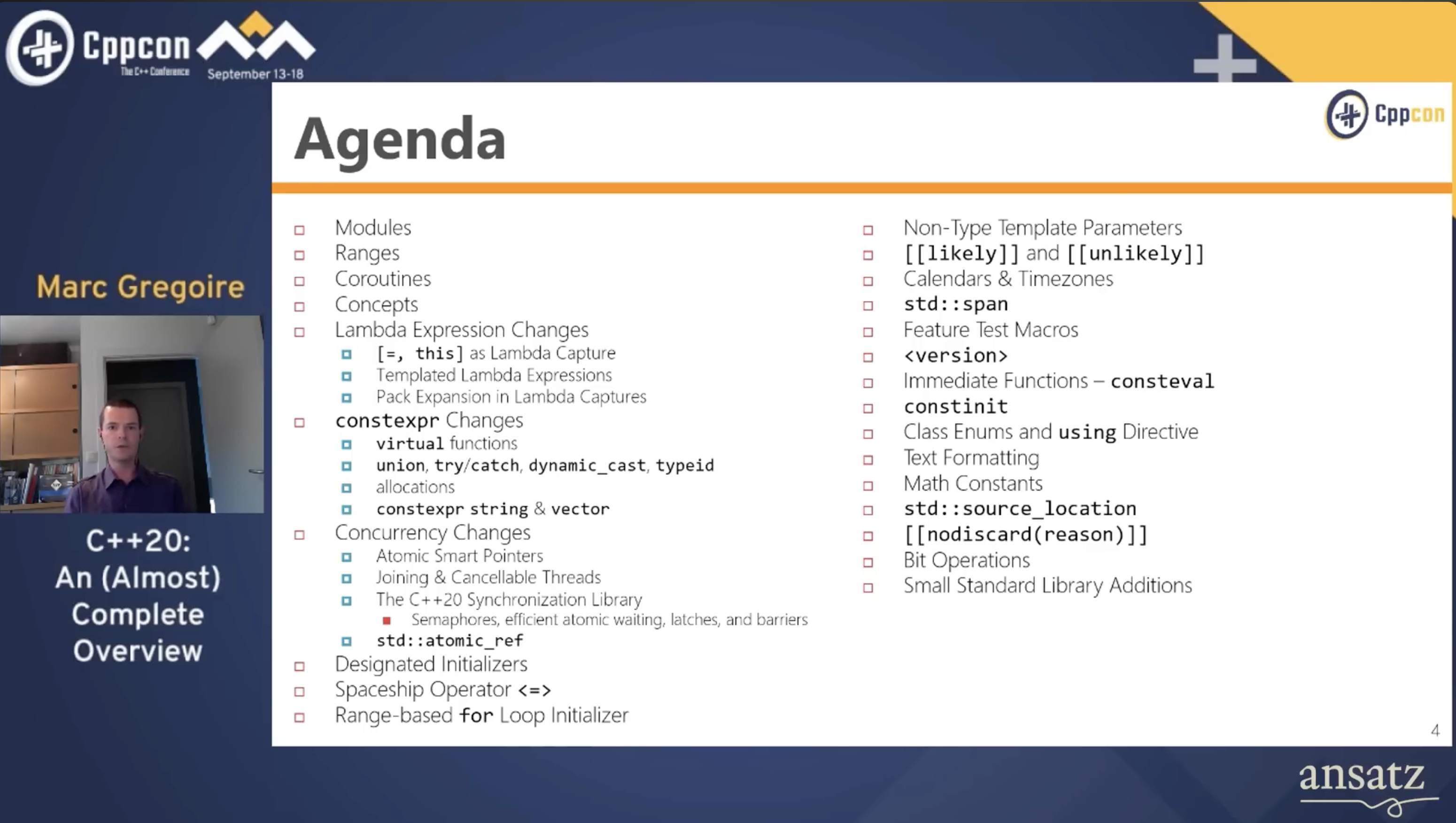
Blatant screenshots of YouTube videos.

C++17 Overview (Mark Isaacson):

C++20 Overview (Marc Gregoire):

C++23 Overview (Marc Gregoire):

C++ Evolution and Use Growth (Bjarne Stroustrup):

Posted in C++ | Tagged: , , , , , | Leave a Comment »

Build Project with CMake

Posted by binglongx on July 10, 2024

While some projects use traditional configure and make approach, a lot of projects now use CMake to help building.

CMake is a meta build system. CMake itself does not build your project.

  • Projects using CMake would store project settings in CMakeLists.txt files.
  • You can run cmake to create actual project files suitable for concrete build tools to build. Examples are:
    • cmake generates Makefile, to be consumed by make to build the project;
    • cmake generates Xcode project files, to be consumed by Xcode to build the project on macOS;
    • cmake generates Visual Studio project files, to be consumed by Visual Studio/C++ to build the project on Windows;

As you can see, CMake enables you to create projects with build portability.

The diagram above is generated from Mermaid:

%% Mermaid drawing, view with https://mermaid.live/
flowchart LR

    classDef Executable fill:#411,stroke-width:2px;
    classDef File fill:#141,stroke-width:2px;

    src[source code]:::File
    cmake_list[CMakeLists.txt]:::File 

    cmake([cmake]):::Executable
    cmakex([cmake -G Xcode]):::Executable

    makefile[Makefile]
    xproj[Xcode project]
    
    make([make]):::Executable
    make_c([cmake --build]):::Executable
    xcode([Xcode]):::Executable

    exe[executable]
    exe_x[executable]

    cmake_list --> cmake --> makefile
    cmake_list --> cmakex --> xproj

    makefile --> make --> exe
    makefile --> make_c --> exe
    xproj --> xcode --> exe_x

    src --> make
    src --> make_c
    src --> xcode

    subgraph source code repo
        cmake_list
        src
    end

    subgraph cmake stage
        cmake
        cmakex
        makefile
        xproj
    end

    subgraph build stage
        make
        make_c
        xcode
        exe
        exe_x
    end

Posted in C++ | Tagged: , , , , , , , | 1 Comment »

Developer’s documentation tools

Posted by binglongx on July 10, 2024

HackMD: real-time collaborating in documentation using MarkDown: http://www.hackmd.io

Slidev: Quickly creating slides: http://www.sli.dev

Mermaid: create diagrams by writing simple text: https://mermaid.js.org/

Posted in C++ | Tagged: , , , , , | Leave a Comment »

Unix project: configure and make

Posted by binglongx on May 25, 2024

For a project distributed as source code in Unix-like systems, upon getting the source, normally you would run:

./configure
make

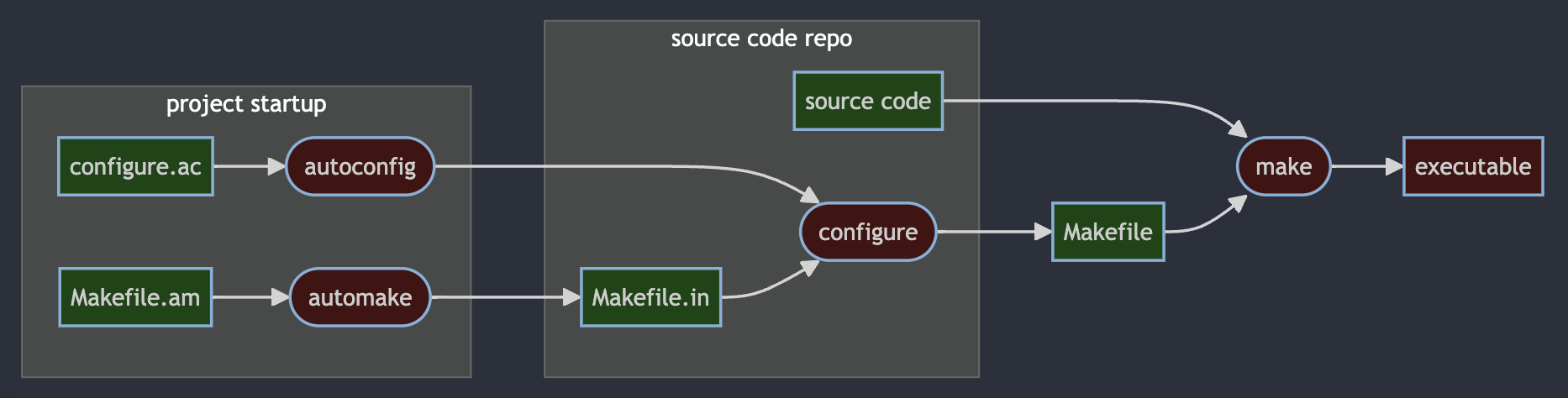
The magic behind configure, make, make install – How it works in Unix explains what’s happening. Below is a simple drawing of the flow. Note that “project startup” was done when the project was first created by the project owner.

The corresponding Mermaid flow char diagram source code:

%% Mermaid drawing, view with https://mermaid.live/
flowchart LR

    classDef Executable fill:#411,stroke-width:2px;
    classDef File fill:#141,stroke-width:2px;

    subgraph project startup
    a[Makefile.am]:::File
    b([automake]):::Executable
    d[configure.ac]:::File
    e([autoconfig]):::Executable
    end

    subgraph source code repo
    c[Makefile.in]:::File 
    f([configure]):::Executable
    j[source code]:::File
    end

    g[Makefile]:::File
    h([make]):::Executable
    i[executable]:::Executable

    a[Makefile.am] --> b([automake]) --> c[Makefile.in]
    d[configure.ac] --> e([autoconfig]) --> f([configure])
    c[Makefile.in] --> f([configure]) --> g[Makefile]
     j[source code] --> h([make])
    g[Makefile] --> h([make]) --> i[executable]

See also: Build Project with CMake

Posted in C++ | Tagged: , , , , , , , , | Leave a Comment »

Socket Server I/O Multiplexing

Posted by binglongx on March 24, 2024

Introduction

In Socket API At A Glance, we discussed the socket APIs and their uses. Let’s check some details how a socket server could be written. The psuedo code below is assuming a TCP connection-oriented server, starting from a very simple version and evolves into more effient versions.

Single-Threaded Blocking IO Version

For a TCP socket server, a basic flow is like below:

fd = socket();
bind(fd, {ip, port});
listen(fd);
while( connected_fd = accept(fd) ) {
    // got the new incoming client client, handle it:
    read(connected_fd);
    // write(connected_fd);
    // ... interact with client whatever agreed way
    close(connected_fd); // done
}
close(fd); // this rarely needs to happen in tutorial 🙂

This basic single-threaded server works, but it has a huge drawback. The code in the while block that handles a new client connection depends on how responsive the clients is, and it’s preventing the server from quickly going back to accecpt() to handle other clients that may come. If the server is handling multiple clients, majority of the clients could feel the server is very slow.

Multi-Threaded Blocking IO Version

A simple improved version would move the new client handling code to a new thread, therefore the main thread can quickly go back to serve other incoming clients:

fd = socket();
bind(fd, {ip, port});
listen(fd);
while( connected_fd = accept(fd) ) {
    // got the new incoming client client, handle it in a new thread:
    thread([connected_fd](){
        read(connected_fd);
        // write(connected_fd);
        // ... interact with client whatever agreed way
        close(connected_fd); // done
    });
}

Now, the server is very responsive to many clients. Any of the already connected clients being less responsive is not slowing down handling of other connected clients or handling of new incoming clients.

However, there is hidden cost of thread. Thread is not free. Asking OS to create a thread takes time. A thread also takes memory like stack space. Once a thread is created, the OS scheduler has one more thread to worry and context switch as well. Adding a few more threads might have unnoticeable impact, but adding thousands of them could be huge performance hit when added up.

Non-Blocking I/O Version

Can we avoid creating a distinct thread for every new client? If we can avoid blocking on read() out of a client, we can promptly process next client, so we could use one thread to process other clients. The fcntl() call modifies the behaviors of the file descriptor, and one of them is to make the socket file descriptor non-blocking. If this is applied, read() would return immediately if the socket has no data arrived yet.

fd = socket();
bind(fd, {ip, port});
listen(fd);
while( connected_fd = accept(fd) ) {
    // got the new incoming client client
    fcntl(connected_fd, F_SETFL, O_NONBLOCK); // make non-block
    connected_fds.push_back(connected_fd);
}

// handle all connected clients here
clients_processing_thread(){
    for(conn_fd : connected_fds) {
        if( -1 == read(conn_fd) && (EAGAIN==errno || EWOULDBLOCK==errno)) {
            continue; // this client has no data arrived yet
        }
        // write(conn_fd);
        // ... interact with client whatever agreed way
    }
}

This looks great: after the main thread adds the incoming client to the file descriptor array, it immediately continues to handle other future incoming clients. All the clients are processed in a separate thread, where if any of them is not ready the thread just move to process next client.

There’s still some drawback. read() call is not free. Each read call involves a syscall that needs to transfer to kernel mode (and come back to user mode). This cost may look small, but if your array has thousands of socket fds, checking them one by one all the time can add up quickly. You can use an extreme analogy that a syscall is like an RPC (Remote Procedure Call), or http request/response if you don’t know RPC. Can we reduce the number of unnecessary system calls?

Also, notice that the for loop is a busy loop in clients processing thread even when there is no ready clients. This should be eliminated.

select() IO Multiplexing Version

Can we reduce the number of syscalls when handling a lot of socket fds, especially when they are not ready yet? We can use select().

select() allows us to give an array of fds, and ask the kernel in one shot how many of them are ready. So it’s one syscall vs. many syscalls.

In the clients processing code, we use select() instead:

fd = socket();
bind(fd, {ip, port});
listen(fd);
while( connected_fd = accept(fd) ) {
    // got the new incoming client client
    connected_fds.push_back(connected_fd);
}

// handle all connected clients here
clients_processing_thread(){
    fdset = build_fds(connected_fds); // set up fds
    n = select(fdset); // blocking, possible to set timeout
    for(int i = 0; i<n; ) {
        if( fdset[i] is ready ) {
            read(fdset[i]);
            // write(fdset[i]);
            // ... interact with client whatever agreed way
            ++i;
        }
    }
}

Cool, now we can use one select() call to learn how many sockets are ready, and handle them accordingly.

As tradition of this post, select() method must have sins. Indeed it has.

  • Cluncky API. What the pseudo code above does not show, is the details that select() works on the fdset. select() expects a bitmask for socket fd values. This means, if you have a few fds and the highest one would still have a low value, then the bitmask can be small. But if you have opened may fds, although you have closed majority of them, you likely have at least a fd with high value, then even you have none at low values, you still have to build a very long bitmask to represent that. You also have to re-build the bitmask before next select() call, because select() uses it as input and output so ruins it.
  • fd number limit. The bitmask length is capped at FD_SETSIZE, so is the maximal number of sockets it can check. This number is 1024 on most platforms. This is often too small for servers handling massive clients. This could be considered part of cluckly API too, but the number is so limiting so it worths call-out.
  • Efficiency. While select() uses one syscall to check the fds, internally still checks every open fd, even if the fd has no traffic. So for a set of fds where majority of them are not active, select() still wastes CPU cycles unnecessarily.

poll() IO Multiplexing Version

The poll() call allows you to set an array only for the fds you want to monitor, and it does not have size limit.

fd = socket();
bind(fd, {ip, port});
listen(fd);
while( connected_fd = accept(fd) ) {
    // got the new incoming client client
    connected_fds.push_back(connected_fd);
}

// handle all connected clients here
clients_processing_thread(){
    fdset = build_fds(connected_fds); // set up fds
    n = poll(fdset); // blocking, possible to set timeout
    for(int i = 0; i<n; ) {
        if( fdset[i] is ready ) {
            read(fdset[i]);
            // write(fdset[i]);
            // ... interact with client whatever agreed way
            ++i;
        }
    }
}

The way you build fds here is very different from that of select(). It’s not a bitmask, but a variable length array for only the fds you want to monitor. If you temporarily do not want to check a certain fd, you can negate it without rebuilding the array, and poll() will happily ignore it.

You also get to specify how long the fds array is, so there’s essentially no limit by this API on how many sockets you want to check (of course there’s practical limit due to other reasons).

However, poll() only solves the cluncky API and number limit problems, it still has efficiency issues.

poll() still needs you to pass a huge array from user mode to kernel mode when there are many fds to monitor. This copying is needed from user mode to kernel mode, mostly for security and robustness of the OS, see Linux Virtual Memory Code Practice (2). Because struct pollfd, the element type of the fds array, needs extra bytes in addition to fd itself, monitoring many sockets each poll() call has to copy for example mega bytes of memory to kernel.

Also poll() internally still needs to check every fd upon the call, with O(n) performance similar to select().

epoll IO Multiplexing Version

epoll is an enhancement of poll(), and it’s event based. (In macOS, kqueue/kevent is the closest match to epoll in Linux.)

To use epoll:

  • Call epoll_create() to create an fd for an epoll instance. This represents a kernel object you need to use for any other epoll functions.
  • Call epoll_ctl() to add, modify or remove a fd that you want epoll to monitor.
  • Call epoll_wait() to wait for any of the fds in epoll instance to become ready or have interesting events.
  • Call close() on the epoll instance if you don’t need to use it any longer.

Obviously epoll API is more complex than poll(), but it overcomes the two performance issues in poll():

  • We can now incrementally modify the fd array you want to monitor with epoll_ctl().
  • epoll internally is event driven, not O(n) query. If there’s no readiness change, epoll_wait() basically has no cost.

This is sample pseudo code:

epollfd = epoll_create1(0); // = epoll_create(1);
fd = socket();
bind(fd, {ip, port});
listen(fd);
while( connected_fd = accept(fd) ) {
    // got the new incoming client client, add to epoll instance
    ev.events = EPOLLIN;
    ev.data.fd = connected_fd;
    epoll_ctl(epollfd, EPOLL_CTL_ADD, conn_sock, &ev);
}

// handle all connected clients here
clients_processing_thread(){
    struct epoll_event events[MAX_EVENTS];
    nfds = epoll_wait(epollfd, events, MAX_EVENTS, -1); // block until some fd ready
    for(int i = 0; i<nfds; ++i) {
        conn_fd = events[i].data.fd;
        read(conn_fd);
        // write(conn_fd);
        // ... interact with client whatever agreed way
    }
}

The code above still uses the main thread exclusively just for accepting new connections (as examples above), but it’s totally possible to put it under monitoring of epoll as well.

In reality using one thread to handle all the massive clients is not practical, as your server may have many CPU cores sitting idle if you do so. So likely you would use a thread pool instead to concurrently handle those clients. That’s beyond this post.

See Also

Posted in Computer and Internet | Tagged: , , , , , , , , , , , | Leave a Comment »

Socket API At A Glance

Posted by binglongx on February 22, 2024

Introduction

  • socket address: For TCP/IP, the socket address is IP address and port number.
  • a socket is the file descriptor;
  • local_addr is the socket address on local computer.
  • remote_addr is the socket address on remote computer.

Socket States

In this diagram there are a few different states a socket can be in. Socket conceptually contains different information and allows different oprations in each state.

  • detached: a socket file discriptor is created through socket(), but there is no socket address associated. This socket conceptually cannot do anything.
    • If you call sendto(remote_addr), socket implementation automatically binds it to a good local socket address (IP and a random port), and moves to bound state, before sending data.
    • connect(remote_addr) moves directly to connected state.
  • bound: the socket is associated with a local socket address (e.g. IP and port). For connection-less socket, you can now receive data from remote party because they can address to you. You can send data as long as you know the remote party’s socket address from a bound socket. Note that when bind() a socket, you can specify “any” IP (INADDR_ANY for IPv4, and in6addr_any for IPv6); when a message from client arrives, it can come though any network interface if your host has multiple interfaces (with different IPs). In bound state, you can choose to bind to a port together with a specific IP, or a floating “any” IP.
  • listening: This is like a special bound state for a connection-oriented socket on server.
  • connected: A connected socket has the full information about both local and remote addresses.

Connection-less Socket (like UDP)

  • The server uses socket() -> bind() , then it can call recvfrom() to get (potentially blocking) for incoming messages;
  • The client uses socket() then it can use sendto(remote_addr) / sendmsg(remote_addr) to send a message to remote server. The socket implementation automatically binds the socket to a local socket address. You can also manually bind() it before using sendto(remote_addr) / sendmsg(remote_addr), but you have to choose IP / port carefully yourself.
  • The receiver end can choose to obtain sender’s socket address when recvfrom() / recvmsg() is called. This address can be used to reply the message, if reply is needed.
  • A connection-less socket can stay in bound state for ever, and it can be used to talk with different remote parties.
  • It is however possible to move the connection-less socket to connected state, by calling connect(remote_addr). After that, you can send message with write()/send() without specifying remote_addr explicitly. You can call connect() again to let the socket point to a different remote socket address, or connect(null) to clear that association to return to bound state.
  • Keep in mind, UDP does not guarantee reliable transfer, therefore a receiver may not receive all the datagrams the sender sent.

Connection-Oriented Socket (like TCP)

  • The server uses socket() -> bind() -> listen() -> accept() sequence.
  • The client uses socket() -> connect(remote_addr).
    • The client may use socket() -> bind(local_addr) -> connect(remote_addr), but binding is automatically done if it uses socket() -> connect(remote_addr).
  • The server’s listening socket is not for data communication. It serves as a mother socket, and the only purpose is to take in a new incoming connection from client. If that incoming connection request is accepted, a new server side socket is spawned in connected state for data communication. The listening server socket never moves into connected state.
    • The new server socket uses the same port number as the listening socket, but since this is a connected socket, it has both local/server IP+port and client IP+port, so incoming data to the port from different clients can be properly distributed to their corresponding server sockets.
    • The client side socket is also moved into connected state, associated with the socket address of the server side, appearing like to the same one it tries to connect() to, althoug on server side it’s served by a different socket.
  • Once the connection is established, both client and server now have a socket in connected state, and they can use read()/write()/send()/recv() to exchange data.

The State Machine Diagram

The state machine diagram is generated by Mermaid tool, see https://mermaid.js.org/syntax/stateDiagram.html. There is the Online Mermaid Editor you can try at https://mermaid.live/, paste the following in there:

%% Mermaid diagram https://mermaid.js.org/syntax/stateDiagram.html
stateDiagram-v2
    detached: detached\n-----------\n(socket)
    bound: bound\n--------------\n(socket)\n(local_addr)
    listening: listening\n--------------\n(socket)\n(local_addr)
    connected: connected\n-----------------\n(socket)\n(local_addr)\n(remote_addr)
    all: all states
 
    classDef VirtualState font-style:italic;
 
    [*] -->  detached : socket()
    detached --> bound : bind(local_addr)
    detached --> bound : sendto(remote_addr)
    bound --> bound : sendto()/recvfrom()/sendmsg()/recvmsg()
    detached --> connected : connect(remote_addr)
    bound --> listening: listen()
    listening --> connected: accept() spawns new
    bound --> connected : connect(remote_addr)
    connected --> connected: read()/write()/readv()/writev()/send()/recv()/\nsendto()/recvfrom()/sendmsg()/recvmsg()/\nconnect()
    connected --> bound: connect(null)
    all:::VirtualState --> [*] : close()
 
    note left of [*]
        Socket API At A Glance, 
        Connection-oriented: SOCK_STREAM (TCP) etc.
        Connection-less: SOCK_DGRAM (UDP) etc.
         
        https://en.wikipedia.org/wiki/Berkeley_sockets
    end note
 
    note left of bound
        Connection-less sockets often stay here,
        using sendto()/recvfrom()/sendmsg()/recvmsg()
        getsockname() returns local socket address.
    end note
 
    note right of listening
        Connection-oriented socket as "mother socket" at server.
        client connecting to it results in a different connected socket.
    end note
 
    note right of connected
        Most Connection-oriented sockets stay here, using read()/write()/readv()/writev()/send()/recv().
         
        Connection-less sockets rarely here. If they are, they
        - can still use sendto()/recvfrom()/sendmsg()/recvmsg();
        - allows connect() to change remote_addr, or connect(null) to go to bound state.

        getpeername() returns remote socket address.
    end note


Some C++ wrapper code for socket is in C++ Wrapper for Socket API.

Posted in Computer and Internet | Tagged: , , , , , , , , , | 1 Comment »

Passport Photo Cropper (Python GUI App)

Posted by binglongx on June 26, 2023

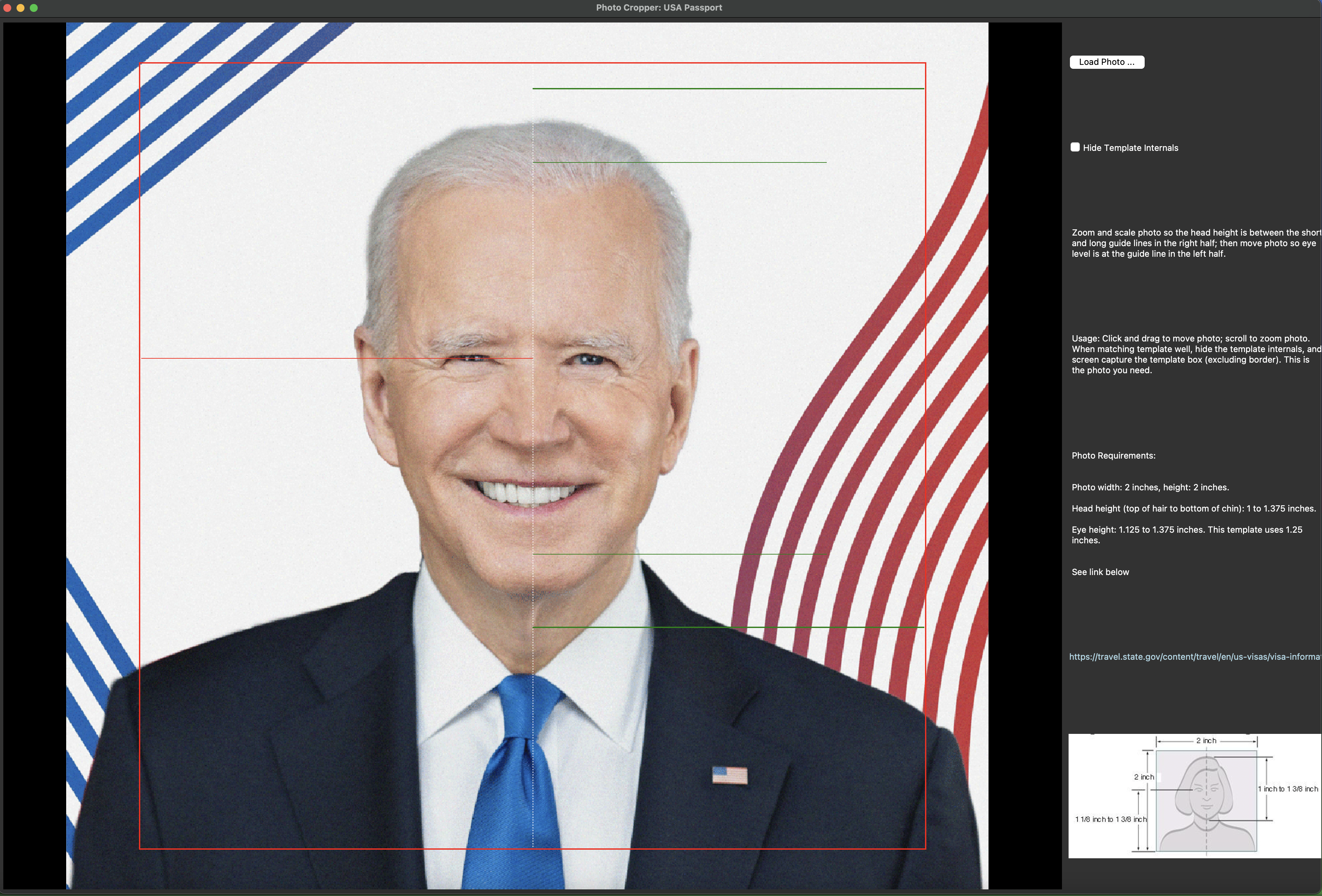
Simple Python app allows interactively zooming and translation of a photo to fit passport photo requirements.

Example of fitting requirements of Chinese passport or visa photo:

Example of fitting requirements of USA passport or visa photo:

The tool can be found at https://github.com/binglongx/PassportPhoto.


Posted in Computer and Internet, Life | Tagged: , , , , , , , , , | Leave a Comment »